Writing a Beacon Object File (BOF) from Scratch in C
Disclaimer: This blog post is intended strictly for educational and authorized security research purposes only. The techniques described here must only be used in environments where you have explicit written authorization. Unauthorized use of these techniques is illegal and unethical. Always operate within the boundaries of applicable laws and your engagement's Rules of Engagement (RoE).
Introduction
If you've worked with a C2 framework during a red team engagement, you've probably hit the moment where you need your implant to do something it doesn't support out of the box. The traditional answer was to drop a binary to disk or spawn a new process - both of which light up every EDR on the endpoint.
Beacon Object Files (BOFs) solve this problem. Originally introduced in Cobalt Strike, the concept has been adopted by open-source C2 frameworks like Havoc. They let you write small, single-purpose programs in C that execute directly inside your agent's memory space - no new process, no file on disk, no child process creation events. Just raw capability injected into an already running context.
In this post, we'll build a BOF from scratch using Havoc as our C2, covering the internal mechanics, the constraints you'll hit, and the patterns that make BOFs a staple in modern red team operations.
What is a BOF?
A BOF is a compiled COFF (Common Object File Format) object file - the intermediate output of a C compiler before linking. Instead of producing a full PE executable, you compile to a .o file and hand it to your C2 agent, which acts as a minimal linker and loader at runtime.
The flow looks like this:
- You write a small C program with a specific entry point.
- You compile it to a COFF object file using a cross-compiler (MinGW).
- The operator loads the
.ofile into the agent via the Havoc client. - The agent (Demon) parses the COFF headers, resolves relocations, maps the sections into its own memory, and calls your entry point.
- Your code runs inside the agent's process and thread, then returns.
- The agent frees the memory. No artifacts remain.
The critical advantage: your code never exists as a standalone executable. There's no PE to scan, no import table to flag, no new process in the tree.
Why BOFs Over Traditional Tooling?
Understanding why BOFs exist requires understanding what they replace.
| Approach | Process Creation | Disk Artifact | CLR Loaded | Memory Footprint |
|---|---|---|---|---|
shell |
Yes | Yes (cmd.exe) | No | Full process |
dotnet inline-execute |
Yes (fork&run) | No | Yes | .NET runtime + assembly |
BOF (inline-execute) |
No | No | No | Tiny (KB range) |
With .NET execution, the agent spawns a sacrificial process, injects the .NET CLR, loads your assembly, runs it, and tears it down. Every step generates telemetry - process creation, CLR loading events, cross-process injection, thread creation. EDR vendors have been stacking detections on this pattern for years.
BOFs sidestep all of it. Your code runs in the agent's existing process and thread. From the endpoint's perspective, nothing new happened.
The BOF API
BOFs don't have access to the standard C runtime. No printf, no malloc, no strlen. Instead, the C2 framework provides a minimal API through a header file. Havoc uses the same beacon.h convention that Cobalt Strike established, making BOFs portable across frameworks.
1. Output Functions
void BeaconPrintf(int type, char *fmt, ...);
void BeaconOutput(int type, char *data, int len);
These send output back to the Havoc teamserver. BeaconPrintf works like printf but routes to the operator's console. The type parameter controls how the output is displayed:
CALLBACK_OUTPUT- standard outputCALLBACK_ERROR- error output (shows in red)CALLBACK_OUTPUT_OEM- OEM encoded output
2. Data Parsing
void BeaconDataParse(datap *parser, char *buffer, int size);
int  BeaconDataInt(datap *parser);
short BeaconDataShort(datap *parser);
int  BeaconDataLength(datap *parser);
char *BeaconDataExtract(datap *parser, int *size);
These let you parse arguments passed from the operator's console. When someone runs your BOF with arguments, the data arrives as a packed binary buffer that you unpack with these functions.
3. Win32 API Access via Dynamic Function Resolution
This is where BOFs get interesting. You can't just call OpenProcess() like normal - there's no import table. Instead, you declare Win32 functions using a special macro convention:
DECLSPEC_IMPORT HANDLE WINAPI KERNEL32$OpenProcess(DWORD, BOOL, DWORD);
DECLSPEC_IMPORT BOOL   WINAPI ADVAPI32$OpenProcessToken(HANDLE, DWORD, PHANDLE);
The naming pattern is MODULE$Function. The agent's COFF loader resolves these symbols at load time by parsing the names, splitting on $, calling LoadLibraryA / GetProcAddress internally, and patching the addresses into your code's relocation table.
This means your BOF has zero static imports. Nothing for static analysis to flag.
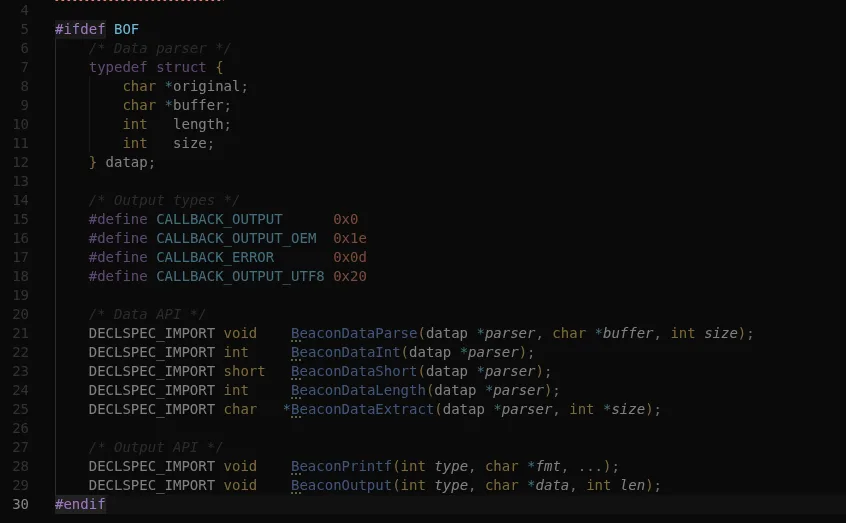 The
The beacon.h header, the entire API surface your BOF has access to.
Building Your First BOF
Let's build a BOF that enumerates privileges on the current process token - useful during post-exploitation to check what you're working with before attempting privilege escalation.
Project Structure
privilege-bof/
  beacon.h
  privilege.c
  Makefile
Getting beacon.h
The beacon.h header is the contract between your BOF and the C2 framework's COFF loader. It defines the output functions, data parsers, and type definitions your code needs. Without it, your BOF has no way to communicate back to the operator.
You can grab it from TrustedSec's BOF template - this is the community-standard version that works across both Cobalt Strike and Havoc. Drop it into your project directory:
mkdir -p privilege-bof && cd privilege-bof
curl -sO https://raw.githubusercontent.com/trustedsec/CS-Situational-Awareness-BOF/master/src/common/beacon.h
If you crack the file open, you'll see it's surprisingly small. The entire API surface fits in roughly 60 lines of actual declarations:
/* beacon.h - BOF API header */

#include <windows.h>

#ifdef BOF
    /* Data parser */
    typedef struct {
        char *original;
        char *buffer;
        int   length;
        int   size;
    } datap;

    /* Output types */
    #define CALLBACK_OUTPUT      0x0
    #define CALLBACK_OUTPUT_OEM  0x1e
    #define CALLBACK_ERROR       0x0d
    #define CALLBACK_OUTPUT_UTF8 0x20

    /* Data API */
    DECLSPEC_IMPORT void    BeaconDataParse(datap *parser, char *buffer, int size);
    DECLSPEC_IMPORT int     BeaconDataInt(datap *parser);
    DECLSPEC_IMPORT short   BeaconDataShort(datap *parser);
    DECLSPEC_IMPORT int     BeaconDataLength(datap *parser);
    DECLSPEC_IMPORT char   *BeaconDataExtract(datap *parser, int *size);

    /* Output API */
    DECLSPEC_IMPORT void    BeaconPrintf(int type, char *fmt, ...);
    DECLSPEC_IMPORT void    BeaconOutput(int type, char *data, int len);
#endif
That's it. The datap struct, a handful of constants, and two groups of function declarations. Everything else - your Win32 API calls, your logic, your output formatting - is on you. This minimalism is by design: the smaller the API surface, the less the COFF loader needs to resolve, and the less can go wrong.
The #ifdef BOF guard means these declarations only activate when you compile with -DBOF. This lets you write code that can optionally compile as both a standalone exe (for testing) and a BOF (for deployment), though in practice most operators just compile straight to BOF.
The Code
#include <windows.h>
#include "beacon.h"

// Dynamic Win32 API declarations
DECLSPEC_IMPORT HANDLE WINAPI KERNEL32$GetCurrentProcess(void);
DECLSPEC_IMPORT BOOL   WINAPI ADVAPI32$OpenProcessToken(HANDLE, DWORD, PHANDLE);
DECLSPEC_IMPORT BOOL   WINAPI ADVAPI32$GetTokenInformation(HANDLE, TOKEN_INFORMATION_CLASS, LPVOID, DWORD, PDWORD);
DECLSPEC_IMPORT BOOL   WINAPI ADVAPI32$LookupPrivilegeNameA(LPCSTR, PLUID, LPSTR, LPDWORD);
DECLSPEC_IMPORT BOOL   WINAPI KERNEL32$CloseHandle(HANDLE);
DECLSPEC_IMPORT LPVOID WINAPI KERNEL32$HeapAlloc(HANDLE, DWORD, SIZE_T);
DECLSPEC_IMPORT BOOL   WINAPI KERNEL32$HeapFree(HANDLE, DWORD, LPVOID);
DECLSPEC_IMPORT HANDLE WINAPI KERNEL32$GetProcessHeap(void);

// Entry point - the agent calls this
void go(char *args, int alen)
{
    HANDLE hToken = NULL;
    DWORD  dwSize = 0;
    LPVOID pBuffer = NULL;
    TOKEN_PRIVILEGES *pPrivs = NULL;

    // Open our own process token
    if (!ADVAPI32$OpenProcessToken(
            KERNEL32$GetCurrentProcess(),
            TOKEN_QUERY,
            &hToken))
    {
        BeaconPrintf(CALLBACK_ERROR, "Failed to open process token.");
        return;
    }

    // First call to get required buffer size
    ADVAPI32$GetTokenInformation(hToken, TokenPrivileges, NULL, 0, &dwSize);

    if (dwSize == 0 || dwSize > 65536)
    {
        BeaconPrintf(CALLBACK_ERROR, "Unexpected buffer size: %lu", dwSize);
        KERNEL32$CloseHandle(hToken);
        return;
    }

    // Allocate on the process heap - safer than stack allocation in BOFs
    pBuffer = KERNEL32$HeapAlloc(
        KERNEL32$GetProcessHeap(), 0x00000008, dwSize); // HEAP_ZERO_MEMORY

    if (pBuffer == NULL)
    {
        BeaconPrintf(CALLBACK_ERROR, "HeapAlloc failed.");
        KERNEL32$CloseHandle(hToken);
        return;
    }

    pPrivs = (TOKEN_PRIVILEGES *)pBuffer;

    if (!ADVAPI32$GetTokenInformation(
            hToken, TokenPrivileges, pPrivs, dwSize, &dwSize))
    {
        BeaconPrintf(CALLBACK_ERROR, "Failed to query token privileges.");
        KERNEL32$HeapFree(KERNEL32$GetProcessHeap(), 0, pBuffer);
        KERNEL32$CloseHandle(hToken);
        return;
    }

    BeaconPrintf(CALLBACK_OUTPUT, "%-40s %s", "PRIVILEGE", "STATE");
    BeaconPrintf(CALLBACK_OUTPUT, "%-40s %s",
                 "----------------------------------------", "----------");

    for (DWORD i = 0; i < pPrivs->PrivilegeCount; i++)
    {
        char  privName[256];
        DWORD nameLen = 255;
        int   j;

        for (j = 0; j < 256; j++) privName[j] = 0;

        if (!ADVAPI32$LookupPrivilegeNameA(
                NULL,
                &pPrivs->Privileges[i].Luid,
                privName,
                &nameLen))
        {
            continue;
        }

        char *state = "Disabled";
        if (pPrivs->Privileges[i].Attributes & SE_PRIVILEGE_ENABLED_BY_DEFAULT)
            state = "Default";
        else if (pPrivs->Privileges[i].Attributes & SE_PRIVILEGE_ENABLED)
            state = "Enabled";

        BeaconPrintf(CALLBACK_OUTPUT, "%-40s %s", privName, state);
    }

    BeaconPrintf(CALLBACK_OUTPUT, "\nTotal privileges: %d", pPrivs->PrivilegeCount);

    KERNEL32$HeapFree(KERNEL32$GetProcessHeap(), 0, pBuffer);
    KERNEL32$CloseHandle(hToken);
}
Key Things to Notice
The entry point is go, not main. The agent looks for this symbol specifically. It receives a packed argument buffer and its length - we don't use arguments in this example, but they're there.
Every Win32 call uses the MODULE$Function convention. No direct imports. The agent resolves each one at load time.
Stack allocation with _alloca. BOFs should avoid heap allocations where possible. The stack is cleaned up automatically when go returns. For cases where you need heap memory, the framework provides internal allocators, but stack is preferred for small, predictable buffers.
No C runtime functions. No memset, no sprintf, no strlen. If you need string operations, you either implement them inline or use Win32 equivalents like lstrcpyA.
Compiling
BOFs must be compiled as COFF object files using MinGW's cross-compiler. Don't link - just compile.
CC = x86_64-w64-mingw32-gcc
CFLAGS = -c -Os -DBOF -o privilege.o

all:
	$(CC) $(CFLAGS) privilege.c

clean:
	rm -f privilege.o
The flags matter:
-c- compile only, do not link. This produces a.oCOFF object file.-DBOF- defines theBOFmacro sobeacon.hactivates its declarations.-Os- optimize for size. BOFs should be small.- No
-lkernel32or any linker flags. There is no linking step.
makeThis produces privilege.o - your BOF, ready for the agent.
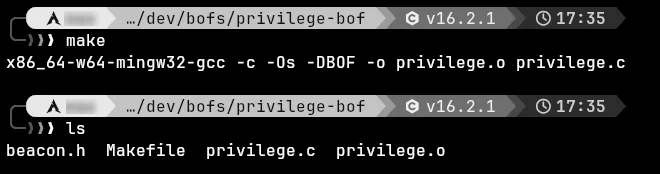 Compiling the BOF with MinGW.
Running the BOF
In the Havoc client, select your active Demon session and open its console. Load and execute the BOF:
demon> inline-execute /path/to/privilege.o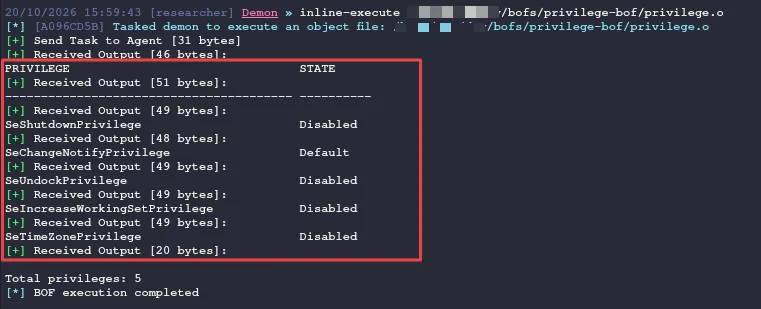 The privilege table rendered directly in Havoc's Demon console after
 inline-execute.
The output shows up directly in the operator console. No process was spawned. No file touched disk. The token query happened inside the Demon agent's own process context.
Common Pitfalls
1. Crashing the Agent
A BOF crash takes the agent down with it - there's no process boundary to absorb the fault. Common causes:
- Buffer overflows on stack-allocated arrays
- NULL pointer dereferences from unchecked API return values
- Calling CRT functions that don't exist in the BOF context
Test thoroughly in a lab. Every crash means burning an implant.
2. Forgetting to Clean Up Handles
Leaked handles persist in the agent's process. Over time, this can cause resource exhaustion or leave detectable artifacts. Always close what you open.
3. Blocking Operations
Your BOF runs on the agent's main thread. A long-running or blocking operation (network call that hangs, infinite loop) will freeze the entire agent. Keep BOFs short and fast.
4. Architecture Mismatch
A BOF compiled for x64 won't run in an x86 agent, and vice versa. Match your compiler target to the agent's architecture. When in doubt, compile both:
x86_64-w64-mingw32-gcc -c -Os -DBOF -o privilege.x64.o privilege.c
i686-w64-mingw32-gcc   -c -Os -DBOF -o privilege.x86.o privilege.c
Going Further
Once you're comfortable with the basics, the pattern scales:
- Process enumeration - walk the process list via
NtQuerySystemInformationwithout callingCreateToolhelp32Snapshot - Service queries - enumerate services and their configurations for privilege escalation vectors
- Registry reads - pull specific keys for situational awareness without
reg.exe - Kerberos ticket operations - extract or manipulate tickets in-memory
- Lateral movement primitives - WMI, SCM, or DCOM calls from within the agent's process
Each of these is a small, focused BOF that does one thing, does it quietly, and returns. The best BOF libraries are collections of these surgical tools.
Defensive Considerations
If you're defending against BOFs, here's what to look for:
- In-memory COFF parsing patterns - memory scanners can look for COFF section headers being parsed at runtime
- Suspicious API call sequences from non-standard modules - a process that isn't
powershell.execallingLookupPrivilegeNameArepeatedly is worth investigating - Agent behavioral signatures - BOFs don't generate new telemetry, but the agent itself still has detectable patterns (sleep timing, named pipes, C2 traffic)
- ETW threat intelligence providers - some EDR hooks can detect dynamic resolution patterns like rapid
GetProcAddressbursts - Kernel-level telemetry - ETW-TI and kernel callbacks still fire regardless of how userland code resolves its imports
BOFs reduce the noise, but they don't make an operator invisible. Layered detection still catches the broader behavior chain.
Conclusion
BOFs represent a shift in how red team tooling is designed - away from monolithic executables and toward small, disposable, in-memory capabilities that leave minimal forensic trace. By understanding how COFF loading works, how the agent resolves dynamic imports, and what constraints you're operating under, you can build surgical post-exploitation tools that do exactly what you need without handing defenders easy wins.
The privilege enumeration BOF we built is intentionally simple. The real power comes from applying this pattern to every post-exploitation task that would normally require dropping a binary or spawning a process. One BOF at a time, you eliminate the artifacts that defenders rely on.
Build it. Break it. Secure it.
Published: October 20, 2026 Author: @0xby7eMe